Monday, April 30, 2012

Supply Allocation Rules


Fairshare rules or supply allocation rules are defined for organizations for dividing the inventory based on a current demand ratio.
Functional Details
Navigation --> Service Supply Chain Planner --> Sourcing --> Supply Allocation Rules


Important Fields
Name - Name of the supply allocation rule
Effective Date Block - Effective From/To Date of the rule
Organizations Block
Org - Organization to which the inventory is divided based on the Priority given in the priority field.Currently we have the fairsharing happening based on the current demand ratio.
Priority - Priority given to the org when dividing the inventory accroding to the current demand ratio.
Technical Details
Tables involved in creating the supply allocation rules are given below
Name of the supply allocation rules is stored in table -  MSC_DRP_ALLOC_RULES
Organizations which are in fairsharing (Organization block ) are stored in table - MSC_DRP_ALLOC_RECEIPT_RULES

SQL Query


select rule_id,
       name,
       description,
       planning_active,
       plan_type
from msc_drp_alloc_rules;

select to_organization_id,
       sr_instance_id,
       receipt_rule_id,
       dmd_priority, -- Demand Priority
       rank -- Fairshare prority
  from msc_drp_alloc_receipt_rules 
 where receipt_rule_id = 'rule id from above query'

The above created supply allocation rules are setup in the assignment sets (for example at 'Instance/Org' level).

If the rule is setup at Org 'A' and the rule contains orgs 'B','C','D', and
If there is demand at org 'B','C','D', then the inventory at Org 'A' is divided into orgs 'B','C','D' based on the current demand ratio between orgs 
'B','C','D'.


Sunday, April 29, 2012

Service Parts Planning Setup - Step 5

Assignment Set
After creating the sourcing rules, the next step is to group the sourcing rules into a set called as Assignment Set.
The assignment set is given in the plan options of SPP Plan. The SPP plan will determine the sourcing rules from the assignment set and generate Planned orders.
Functional Details
Navigation -- Service Supply Chain Planner --> Sourcing --> Assign Sourcing Rules


Important Fields
Assignment Set - Name of the assignment set
Description    - Description of the assignment set
Assignments Block
Sourcing Tab
Assigned To - Every sourcing rule can be assigned at different levels as shown below.

Item-Instance-Organization - Sourcing rule will be applicable to the item given in the Item/Category field and organization given in the Instance/Org field.
Instance-Organization      - Sourcing rule will be applicable to all the items of the organization given in the Instance/Org field
Category-Instance-Org      - Sourcing rule will be applicable to all the items under the category given in the Item/Category field and organization given in the Instance/Org field.
Instance/Org - Source Instance code and the organization
Item/Category - Item or category to be enetered if the sourcing rule is being assigned at item level or category level
Type - Sourcing Rule
Sourcing Rule/BoD - Sourcing Rule Name
Condition  - If the sourcing rule is for movement of usable parts then the condition will be 'Usable'. If the sourcing rule is for movement of defective parts then the condition will be 'Defective'
Region/Zone - Region or Zone to be entered if the sourcing rule is being assinged at region level or Zone level.

Supply Allocation Tab


 Supply Allocation rules are to be entered if we want to enable fairsharing between organizations.
Assigned to - One of  'Instance-Org', 'Category-Instance-Org', 'Item-Instance-Org'
Instance/Org - Source Instance code and the organization
Item/Category - Item or category to be enetered if the sourcing rule is being assigned at item level or category level
Allocation Rule - Fairshare rule name
Technical Details
The tables involved in the assignment set are given below
1) Assignment set name is stored in -- MSC_ASSIGNMENT_SETS
2) Assignment block details are stored in -- MSC_SR_ASSIGNMENTS

SQL Query


select assignment_set_id, 
       sr_instance_id,
       assignment_set_name,
       description
  from msc_assignment_sets 
 where assignment_set_name = 'assignment set name';

--For Sourcing Tab

select assignment_id,
       assignment_set_id,
       assignment_type,
       sourcing_rule_id,
       organization_id,
       sr_instance_id,
       inventory_item_id,
       category_set_id,
       category_name       
  from msc_sr_assignments
 where assignment_set_id = 'assignment set id';

-- For Supply Allocation Tab

select assignment_id,
       assignment_set_id,
       assignment_type,
       sourcing_rule_id,
       organization_id,
       sr_instance_id,
       inventory_item_id,
       category_set_id,
       category_name       
  from msc_sr_assignments
 where sourcing_rule_id = -1
-- sourcing rule will be -1 for all fairshare rules

   and assignment_Set_id = 'assignment set id';

Wednesday, April 25, 2012

Service Parts Planning Setup - Step 4

Sourcing Rules
After the organizations are assigned to the 'Service Supply Chain Planner' responsibility, we need to create sourcing rules.
In a supply chain network, Sourcing Rules define from what all organizations an organization's demand is fulfilled.
If there are more than one organizations, that can replenish an organization 'A',then sourcing rules gives the flexibility to give the Rank and also the Allocation Percentage for each of the replenishing organizations.
 Functional Details
Navigation - Service Supply Chain Planner --> Sourcing --> Sourcing Rules
If the system asks for choosing an organization we can choose the organization for which we want to create the sourcing rule for.

Sourcing Rules can be created at Org Level, or Global Level.Global level sourcing rule will be available for all orgs.
Important Fields
Name - Name of the sourcing rule
Description - Description of the sourcing rule
Radio button - All orgs (Global Level) , Org (Org Level)
Check box - Planning Active
This check box will be checked (automatically) only when sum of the allocation percentages of the shipping organizations equals 100 %.The sourcing rule will be valid only when the 'Planning Active' checkbox is checked
Effective Date - The date from/to which the sourcing rule will be effective
Shipping Organizations block
 Type - Transfer From, Make At, Buy From, Repair At
 Org  - Shipping Organization
 Inventory Rebalance - Check box to determine if the shipping org is a rebalancing org
 Inventory Rebalancing Rank - If there is more than one inventory rebalancing org, then we can sepecify an inventory rebalancing org
 Supplier, Supplier Site - Will be populated for Repair Vendor organizations or for Supplier orgs.
Allocation % - The percentage of demand that the shipping org should satisfy.
(If there is more than one shipping org, the allocation % should sum of to 100 %)
 Rank - If there are more than one shipping organizations, then the Replenishment order of the orgs.
 Shipping Method, Intransit Time - Shipping details between Shipping Organization and the organization for which the sourcing rule is getting created
If Org B is shipping to Org A, then we give the Type as 'Transfer From'
If Org R is a Repair Vendor Org, then we give the Type as 'Repair At'
Rebalancing (Circular sourcing):The key difference between circular sourcing and normal sourcing is that a circular source participates in the supply chain replenishment only in case of excess (or surplus) inventory that will not be needed within a given time fence.
If Org A is rebalancing with Org B, then for circular sourcing to come into effect, it is mandatory to setup a rebalancing relationship between Org B and Org A.

Technical Details

All the tables that are involved in the sourcing rules are given below
Sourcing Rule Name is stored in table - MSC_SOURCING_RULES
The Effective dates of the sourcing entries is stored in table - MSC_SR_RECEIPT_ORG
The source organization details (shipping organizations) are stored in  - MSC_SR_SOURCE_ORG
The shipping method is stored in table - MSC_INTERORG_SHIP_METHODS


SQL Queries

1)

select sr_instance_id,
       sourcing_rule_id,
       sourcing_rule_name,
       description,
       planning_active,
       sourcing_rule_type
  from msc_sourcing_rules 
 WHERE SOURCING_RULE_NAME = 'sourcing_rule_name';

2)


select sr_receipt_id,
       sr_instance_id,  -- source instance id
       sr_receipt_org,
       sourcing_rule_id,
       effective_date,
       disable_date       
  from msc_sr_receipt_org 
 where sourcing_rule_id = 'sourcing_rule_id';
3)

 select source_organization_id,
        circular_src,     -- 'Y' if circular source is enabled
        circular_src_rank,
        allocation_percent,
        rank,                     -- Replensihment Rank
        ship_method
   from msc_sr_source_org 
  where sr_receipt_id = 'from msc_sr_receipt_org table';
4)

  select from_organization_id,
         to_organization_id,
         ship_method,
         default_flag,
         intransit_time,
         sr_instance_id
    from msc_interorg_ship_methods
   where from_organization_id = 'source_org_id'
     and to_organization_id = 'to_org_id'
     and plan_id = -1;

Tuesday, April 24, 2012

Service Parts Planning Setup - Step 3

Organization Security

After the collections process is completed and all entities are collected to VCP, the next step is to assgin organizations to the respective responsibilities, so that each responsibility in VCP can view that organizations data.


Functional Details
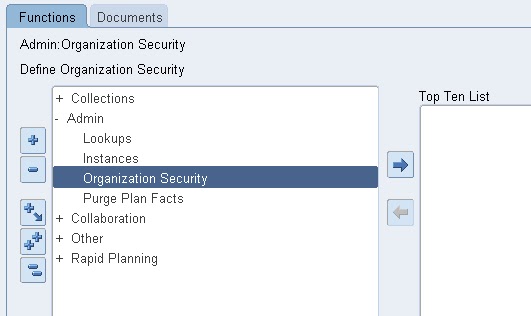
Navigation - Service Supply Chain Administrator --> Admin --> Organization Security


Once we open the 'Organization Security' jsp page, we can assign organizations to each of the VCP responsibility.For Service Parts Planning setup, we need to assign the organizations that needs to be planned to 'Service Supply Chain Planner' responsibility


Technical Details
Organizations that are collected to VCP will be available in the table MSC_TRADING_PARTNERS


SQL Query
SELECT sr_tp_id,
       sr_instance_id,
       organization_code,
       partner_type,
       partner_name,
       operating_unit,
       operating_unit_name
  FROM msc_trading_partners
 WHERE partner_type = 3
   AND organization_code = 'Instance_code:Org code from source instance'

Monday, April 23, 2012

Collections - PDP and ODS


A) Planning Data Pull
   This program refreshes the snapshots on source instance
   Puts data into staging tables of VCP
   1) Refresh snapshots on source instance    
      Snapshots are materialized views. These views gets refreshed by a program called 'Refresh Collection Snapshots'.This program gets triggered on source instance. It refreshes all the snapshots of those entities that are being collected in the current collections run.


Examples of Snapshots.
      MTL_SYS_ITEMS_SN     -- Snapshot for Items
      MTL_ITEM_CATS_SN     -- Snapshot for Item Categories
      MTL_SUPPLY_SN          -- Snapshot for Onhand Inventory details

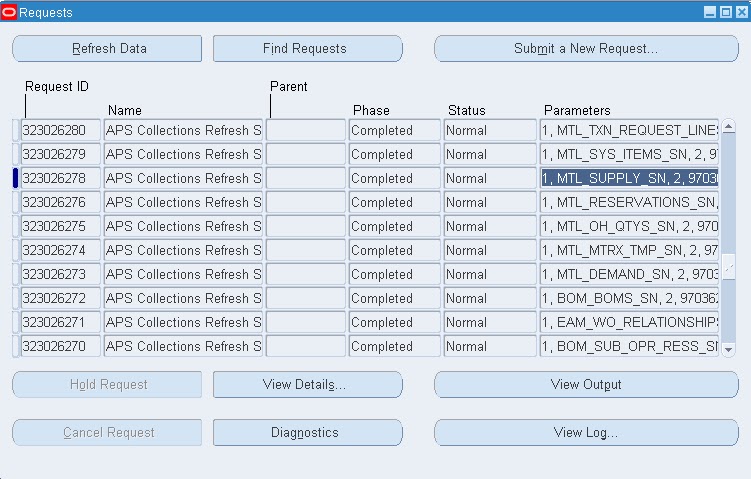
Below figure showing few of the MTL Snapshots.


   2) After the 'Refresh Collections Snapshots' program is completed on source,the 'Planning Data Pull' process submits 'Planning Data Pull Workers' to load the data into VCP staging tables. The 'Planning Data Pull Workers' take the data from the refreshed snaphsot views and load the data into VCP staging tables

Examples of staging tables
      MSC_ST_SUPPLIES              -- Staging table for supply details
      MSC_ST_SYSTEM_ITEMS       -- Staging table for items
      MSC_ST_ITEM_CATEGORIES  -- Staging table for item categories

B) Planning ODS Load
After the staging tables are populated by Planning Data Pull and Planning Data Pull Workers,The next program in the collections process is the Planning ODS Load.This program performs validations on the staging tables and submits 'Planning ODS Load Workers' to load the data into VCP base tables.

Examples of VCP base tables
  MSC_SUPPLIES               -- Base table for supply details
  MSC_SYSTEM_ITEMS       -- Base table for items
  MSC_ITEM_CATEGORIES  -- Base table for item cateogries


After the data is loaded into base tables, the program 'Planning Data Collection - Purge Staging Tables' program is submitted.This program purges the data from staging tables.


Collection Method

There are three ways in which we can collect data to VCP - Complete Refresh, Target Refresh, Netchange Refresh
Complete Refresh - In Complete Refresh, all the entities that were previously collected into VCP will be removed and all the entities will be recollected from source.
Target Refresh   - In Target Refresh, only those entities that are being collected as part of the collection run will be removed from VCP and recollected from source.
Netchange Refresh - In NetChange Refresh, only the difference of the data that is on source and not on VCP will get collected from source.


Sunday, April 22, 2012

Service Parts Planning Setup - Step 2

After the organizations which are to be planned are setup in VCP, the next step is to run Collections.

 
Collections

 
The process of getting data from source instance to Destination Instance (VCP) is called as Collections Process.


Collections process can be invoked by a request set by name - Planning Data Collection
There are two steps involved in collections process. Each step below will be discussed in detail.

  A) Planning Data Pull
     1) Refreshes the snapshots on Source Instance
     2) Puts data into the staging tables of VCP.
 B) Planning ODS Load
    1) Performs validations on the staging tables data and inserts the data into the base tables of VCP.
    2) Purges the staging table data.

 Functional Details
Navigation - Service Supply Chain Administrator --> Collections --> Oracle Systems --> Standard Collection

 
 Some of the entities that collections process brings in to VCP.

 Bill of Materials (BOM), Routings, Calendars, Items, Supersession chians of the items, On Hand inventory details,Planners, Purchase documents, Sales Orders, Reservations, Suppliers, Customers, Organizations, Subinventories, Sourcing Rules, Shipping Methods,Currency conversion details, External/Internal Repair Orders, WIP orders, Install Base under contracts, Notes (Supersession notes details)


Technical Details

For each of the source instance, all the collected entities are stored in base tables of VCP with 'Plan_id = -1'


Friday, April 20, 2012

Service Parts Planning

Let us start exploring the detailed Functional setups and Technical aspects of the Service Parts Planning Module

Service Parts Planning setups

1) Setup Organizations

After the VCP instance is created, we need to setup organizations in VCP. These are the organizations that will be planned in VCP.

Functional setup
 Navigation - Service Supply Chain Administrator --> Admin --> Instances --> Organizations (B)
 Field details:

   Org               - Organization Code defined on the source instance
   Description    - Description of the org. Will be populated automatically.
   Type             - Type of the org. (Will be discussed further)
   Enabled         - Org is available               
   Collection Group             - User defined name which is used when running collections.(Collections will be discussed in detail)
 Below screenshot shows the organizations setup form


 Organization Type: An organization can be a DC (Distribution Center),   
                             External Repair (External Repair Organization),
                             Internal Repair (Internal Repair   Organization), Supplier, 
                             Field Technician organization etc.
 An example of Distribution center is -  Central Warehouse of a country from where the material is shipped to other warehouses managing small areas.

Technical Details
Entry made into the Organizations form will get saved into the table
                MSC_INSTANCE_ORGS

Important Columns:
SR_INSTANCE_ID    -- Source instance id
ORGANIZATION_ID   -- Organization Id of the organization entered. This value is derived from Source instance
ORG_GROUP         -- The collection group that we enter while setting up the org

ORGANIZATION_TYPE -- Type of the organization.             
                                  (Example: 6 - DC, 4 - External Repair, 8 - Supplier etc)
SQL Query

 SELECT sr_instance_id,
        organization_id,
        org_group,
        organization_type
   FROM msc_instance_orgs;